Server expiry
Give servers an end date — for trial accounts, test servers, courses or short projects. Expiry is opt-in: only customers or servers you configure are affected; everyone else works exactly as before.
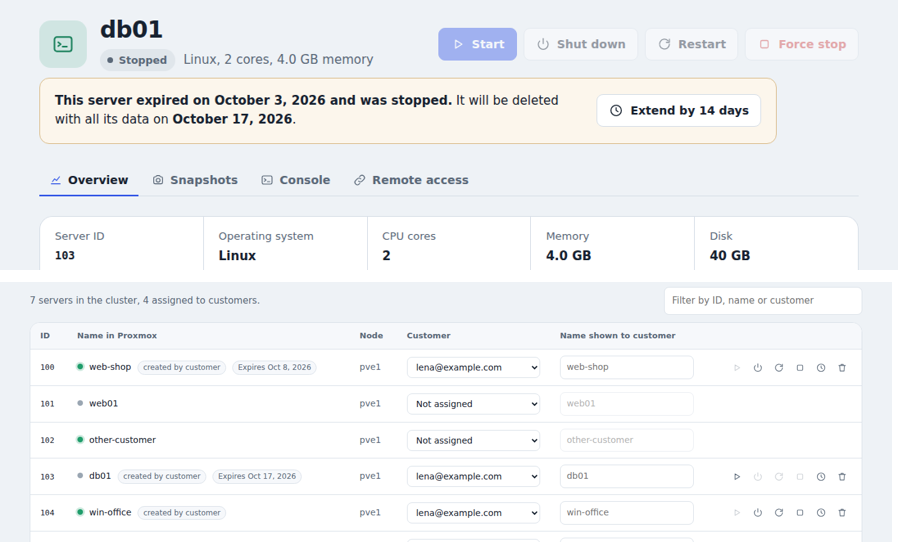
Where you set it
| For | Where | Options |
|---|---|---|
| A customer | Customers → Limits → Expiry | After a number of days (each new server gets its own date, e.g. 14 days after creation) or On a date (all their servers end then, also the ones you assigned) |
| A single server | Servers → clock button | set a date, +7 / +30 days, or No expiry |
Changing a customer's rule: a fixed date applies to all their servers right away (except dates you set by hand on a server); Never removes rule-based dates; After a number of days applies to servers created from then on. Reassigning a server to another customer resets its expiry to the new customer's rule.
Tick Customer may extend each server once to let customers extend by themselves (by the self-extension days in Settings).
What happens
| Stage | When (default) | What happens |
|---|---|---|
| Active | until the expiry date | Customers see Expires in N days in the list and a banner on the server page |
| Reminders | 7 and 1 days before | Email to the customer (a reminder is skipped if the server didn't exist that long before, e.g. no "7 days" mail for a 3-day server) |
| Expired | at the expiry date | The server is stopped; the customer can't start, resize or reinstall it. Email with the deletion date |
| Grace period | 14 days | Data is kept. You (or the customer, if allowed) can extend with one click — the server becomes usable again |
| Last notice | 1 day before deletion | Email to the customer |
| Deleted | after the grace period | Server, disks and snapshots are deleted; final email |
Safety rules
- Only servers the customer created are deleted automatically. Servers you assigned are only stopped at expiry; they stay until you decide (Expired · your decision in the list).
- No deletion without a warning: if the customer couldn't be emailed (email not set up), the server stays stopped and is listed in the summary instead.
- Pause deletions (Settings → Server expiry): expired servers are only stopped until you switch it off — e.g. during maintenance.
- Every step is stored per server, so a panel restart never repeats an email or skips a step.
- Everything appears in the Activity log.
Settings
Settings → Server expiry:
| Setting | Default |
|---|---|
| Reminders (days before) | 7, 1 |
| Grace period | 14 days (0 = delete right at expiry) |
| Self-extension | 14 days |
| Pause deletions | off |
| Daily summary to administrators | on — only on days when something happened or expires within a week |
Check now runs the check immediately and shows what it did. It also runs by itself
every 5 minutes; EXPIRY_CHECK_SECONDS in .env changes that, and 0 switches automatic
runs off (then only Check now acts).
Reminders and notices need email to be set up.